Introduction
This vignette demonstrates how to configure and use the checkpointing functionality in MetaRVM with examples. Checkpointing allows to store the model state at specific time points during the simulation, allowing one to resume runs from saved states.
How Checkpointing Works
MetaRVM’s checkpointing system is configured through the YAML configuration file.
- Saving checkpoints: During simulation, the complete state (compartments, parameters, time step) is saved to disk at specified dates
- Restoring from checkpoints: A new simulation can be initialized from a previously saved checkpoint, continuing from that point forward
- Flexible scheduling: Exact dates when checkpoints should be saved are to be supplied, or by default it will checkpoint at the end-of-simulation date.
Configuration Parameters
The checkpointing system uses three main configuration options in the
simulation_config section:
-
checkpoint_dir: Directory where checkpoint files will be saved (created if it doesn’t exist) -
checkpoint_dates: (Optional) List of specific dates when checkpoints should be saved -
restore_from: (Optional) Path to a checkpoint file to resume from
Example
For the purpose of this example, we will set the checkpointed directory to be a temporary directory, and will create a temporary yaml configuration file based on a template.
Set Up
library(MetaRVM)
options(odin.verbose = FALSE)

# Get the example configuration file
example_config <- system.file("extdata", "example_config_checkpoint.yaml",
                              package = "MetaRVM")

# Create a temporary directory for checkpoints
checkpoint_dir <- tempdir()
cat("Checkpoint directory:", checkpoint_dir, "\n")
#> Checkpoint directory: /tmp/RtmpdtpnKS
Create a Configuration with Checkpointing
Now copy the example configuration and modify it to add checkpointing:
# Read the example configuration
yml <- yaml::read_yaml(example_config)
yml_tmp <- data.table::copy(yml)

# Assign checkpoint directory
yml_tmp$simulation_config$checkpoint_dir <- checkpoint_dir

# Create a temporary config
temp_config <- tempfile(tmpdir = dirname(example_config), fileext = ".yaml")
yaml::write_yaml(yml_tmp, temp_config)
temp_config <- normalizePath(temp_config)
Run Simulation with Checkpoints
# Run the simulation
results <- metaRVM(temp_config)

# Check what checkpoint files were created
checkpoint_files <- list.files(checkpoint_dir,
                               pattern = "^chk_.*\\.Rda$",
                               full.names = FALSE)

if (length(checkpoint_files) > 0) {
  for (file in checkpoint_files) {
    cat("  -", file, "\n")
  }
} else {
  cat("  (No checkpoint files found)\n")
}
#>   - chk_2024-12-29_1.Rda
Examine the Results
cat("Number of instances:", results$run_info$n_instances, "\n")
#> Number of instances: 1
cat("Date range:", format(results$run_info$date_range[1]), "to",
    format(results$run_info$date_range[2]), "\n")
#> Date range: 2024-10-01 to 2024-12-29

# Display first few rows
print(head(results$results, 10))
#>           date    age   race  zone disease_state        value instance
#>         <Date> <char> <char> <int>        <char>        <num>    <int>
#>  1: 2024-10-01   0-17      A    11             D 2.252583e-04        1
#>  2: 2024-10-01   0-17      A    11             E 1.366242e+01        1
#>  3: 2024-10-01   0-17      A    11             H 2.304447e-01        1
#>  4: 2024-10-01   0-17      A    11         I_all 2.742766e+01        1
#>  5: 2024-10-01   0-17      A    11       I_asymp 3.560183e-01        1
#>  6: 2024-10-01   0-17      A    11         I_eff 2.656285e+01        1
#>  7: 2024-10-01   0-17      A    11     I_presymp 8.307093e-01        1
#>  8: 2024-10-01   0-17      A    11        I_symp 2.624093e+01        1
#>  9: 2024-10-01   0-17      A    11             P 3.074200e+04        1
#> 10: 2024-10-01   0-17      A    11             R 1.148308e+01        1
Resume from a Checkpoint
We’ll create a new configuration that restores from the checkpoint. We need to provide the checkpoint file name, and a start date which should be the next day of the end date in the previous run.
# Get the first checkpoint file
checkpoint_files_full <- list.files(checkpoint_dir,
                                    pattern = "^chk_.*\\.Rda$",
                                    full.names = TRUE)

if (length(checkpoint_files_full) > 0) {
  checkpoint_to_restore <- checkpoint_files_full[1]

  cat(checkpoint_to_restore, "\n\n")

  new_start_date <- "12/30/2024"
  yml_tmp <- data.table::copy(yml)
  yml_tmp$simulation_config$start_date <- new_start_date
  yml_tmp$simulation_config$restore_from <- checkpoint_to_restore
  yml_tmp$population_data$initialization <- "population_init_n24_only_mapping.csv" # ensure that we don't want to reinitialize the population with the original initial conditions

  temp_config_resume <- tempfile(tmpdir = dirname(example_config), fileext = ".yaml")
  yaml::write_yaml(yml_tmp, temp_config_resume)
  temp_config_resume <- normalizePath(temp_config_resume)


  # Run the resumed simulation
  results_resumed <- metaRVM(temp_config_resume)

  cat("Number of instances:", results_resumed$run_info$n_instances, "\n")
  cat("Date range:", format(results_resumed$run_info$date_range[1]), "to",
      format(results_resumed$run_info$date_range[2]), "\n")

} else {
  cat("No checkpoint files found to resume from.\n")
}
#> /tmp/RtmpdtpnKS/chk_2024-12-29_1.Rda
#>
#> Number of instances: 1
#> Date range: 2024-12-30 to 2025-03-29
Plot
run1_hosp_sum <- results$results[disease_state == "H", .(total = sum(value)), by = "date"]
run2_hosp_sum <- results_resumed$results[disease_state == "H", .(total = sum(value)), by = "date"]

library(ggplot2)
ggplot(rbind(run1_hosp_sum, run2_hosp_sum), aes(date, total)) +
  geom_line(, color = "red") +
  geom_vline(xintercept = as.Date("2024-12-29"), linetype = "dashed") +
  labs(y = "Hospitalizations", x = "Date") + theme_bw()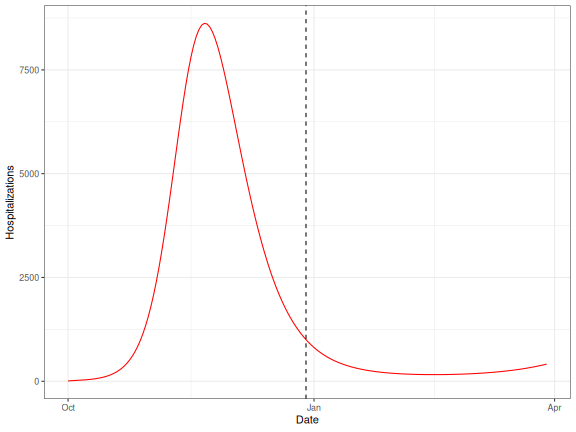
plot of chunk plot
Understanding Checkpoint Files
When checkpointing is enabled, MetaRVM creates checkpoint files with the following naming convention:
chk_YYYY-MM-DD_N.RdaWhere: - YYYY-MM-DD is the checkpoint date -
N is the simulation instance number (1 to nsim)
For more information on configuring MetaRVM simulations, see the YAML Configuration vignette.